If you're creating line sheets and wholesale catalogs for B2B buyers, you know they need to be more than just product lists—they must be professional, current price lists that drive efficiency. This guide walks you through the exact steps to use Catalogly to create powerful, custom wholesale line sheets, and automatically update all your pricing without tedious manual work or design revisions.
Creating the Perfect Wholesale Line Sheet
The foundation of any successful B2B operation is an efficient, clear line sheet. Your catalog must provide all necessary purchasing data (SKU, quantity, price) in a format optimized for business buyers who are often placing large, repetitive orders. Here's how you set up that structure.
Selecting Page Layout for Your Line Sheet
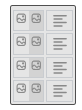
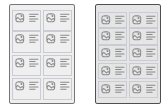
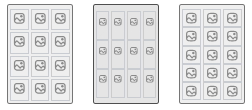
Catalogly makes sure your line sheet design works for wholesale. We offer 30+ line sheet templates specifically designed to efficiently display multiple products and critical details per page, catering to the unique needs of B2B buyers who prioritize information density.
You have the choice between maximizing product density or prioritizing visual detail:
- High-Density Layouts: These are ideal for quick-reference wholesale line sheets and price lists. They accommodate 15 or more products per page, perfect for complete product dumps where speed of scanning is crucial for your buyers.
- Detailed Layouts: Use these to showcase featured or premium items in your line sheet. They feature multiple images per product and an expanded description field on the side, where visual appeal is a key selling point.
Selecting Your Product Range
You don't need to spend time creating a brand new collection in Shopify just for your catalog. You have complete control over product selection within the app.
You can easily pull in an existing Shopify collection (like your "Wholesale Available" set) directly. Alternatively, you can add products manually one by one. This flexibility ensures you curate a highly specific list of featured items, allowing you to easily exclude any consumer-only or low-stock products.
Adding Critical B2B Information
A functional wholesale catalog requires data points that go far beyond a standard retail description. This is where your Shopify metafields become essential.
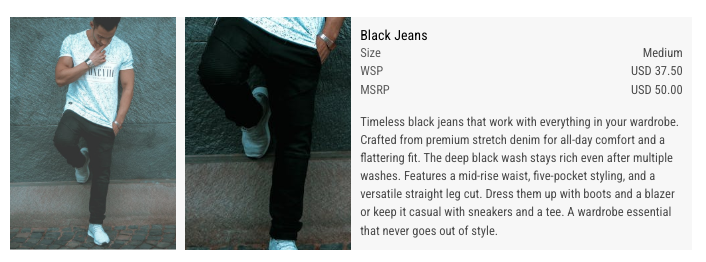
The app can pull any metafields you use to store B2B data (such as lead times, case pack quantity, minimum order quantity, or specific shipping details) and display them in your catalog layout. Simply map these metafields to custom fields in your chosen template to integrate this vital data seamlessly.
It is also standard practice to include a separate terms and conditions page. This simple step ensures all legal and transactional requirements are included in the final PDF deliverable, protecting both you and the buyer.
Managing Pricing in Your Wholesale Line Sheet
Keeping wholesale prices current in your line sheet is usually the most time-consuming task, but it doesn't have to be. Catalogly provides flexible tools to calculate discounts or import specific price tiers while keeping all data linked to your Shopify products.
Pricing Strategy Overview
Wholesale line sheet pricing typically falls into two categories: a simple flat discount calculated off the retail price, or complex, custom-tiered pricing that cannot be represented by a simple percentage.
Your goal is always to maintain prices in your B2B catalog that are accurate, up-to-date, and applied correctly across the entire product range.
Defining the Pricing Workflow
Use this simple, four-step process to establish your wholesale pricing within your line sheet:
- Source Retail Data: Start by adding a collection of products. By default, your line sheet template will pull and display the standard retail price sourced directly from Shopify.
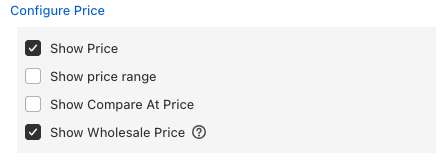
- Enable Wholesale Price Display: In the product details section, select the wholesale price field to display it on your line sheet.
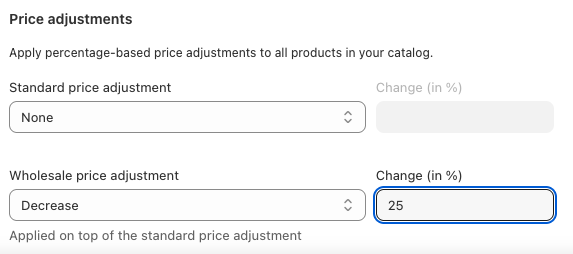
- Apply Wholesale Discount: Access the pricing settings in the Catalog Builder. You can now apply a flat discount percentage to all your products (e.g., a 20% flat discount off retail).
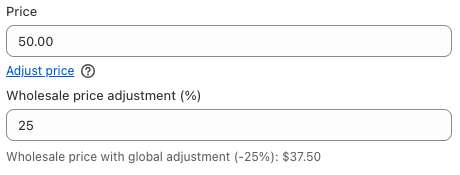
- Create Overrides: If you need to make exceptions, you can easily create manual overrides for specific products. For example, if most products receive 20% off, but a few high-value items require 25% off or a specific dollar amount, you can manually overwrite their calculated price directly in the Builder.
Seeing the Results in Your Line Sheet
Here's what the pricing progression looks like in your actual line sheet as you configure wholesale pricing:
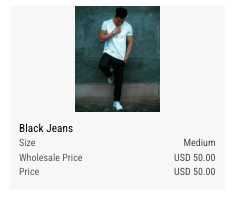
Step 1: Initial Setup - When you first enable both retail and wholesale price fields in your line sheet, they initially display the same value from Shopify. This is your starting point.
Step 2: After Applying Discount - Once you apply your wholesale discount percentage, you immediately see the price difference reflected in your line sheet. The wholesale price now shows the discounted amount.
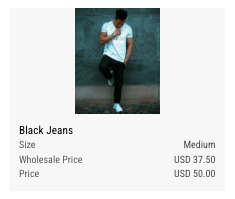
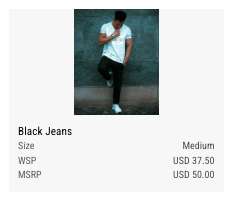
Step 3: Customizing Labels - Finally, you can rename the price labels to match your business terminology. Instead of generic "Price" and "Wholesale Price," you might use "MSRP" and "Your Price," or any labels that resonate with your buyers.
Importing Custom Tiered Pricing for Your Line Sheet
If your wholesale line sheet prices are highly variable (different tiers for different partners) and cannot be represented by a flat discount, importing custom prices via a CSV file is the most efficient method.
How it Works: When you import prices from a CSV, they are displayed as the product price in your line sheet. The key advantage is that you have full control over how these prices are labeled:
- Import your pricing data: Upload a CSV containing your wholesale prices, cost prices, or any other pricing data you want to show in your line sheet.
- Label them appropriately: Display these prices with labels like "Wholesale Price," "Partner Price," or "B2B Price"—making it clear to buyers what pricing tier they're seeing.
- Full control over presentation: You're showing your product's price field, but you control what label appears next to it in your B2B catalog.
- Perfect for complex pricing: This is ideal when wholesale line sheet prices vary significantly by partner, product tier, or other custom factors that can't be achieved with a simple percentage discount.
You can even layer an additional flat discount on top of these CSV-imported custom prices if required for promotions.
Automated Updates: Keeping Your Line Sheet Current
This feature is fundamental for maintaining a live wholesale line sheet and price list. When retail prices change in Shopify, you can bypass the need to start over. You simply update the data quickly, protecting the custom design work you've already completed in your B2B catalog.
To update your wholesale line sheet prices quickly, you have two primary methods:
1. CSV Re-Import
If your custom wholesale prices are tiered, simply update and re-import your CSV file containing the new price list. This is a targeted action that overwrites only the designated wholesale price fields, leaving all other product data untouched.
2. Flat Discount Refresh
If you use a flat rate discount calculated from your standard retail price, use the Refresh Product Details feature:
- Navigate to the Sync & Refresh tab.
- Select the option to refresh prices from your store.
- The system pulls the new retail prices from Shopify and instantly re-calculates the flat discount for all items, ensuring your price list is 100% current.
By selectively refreshing only the price and inventory fields, you ensure your custom layouts, specialized descriptions, and essential B2B metafields remain intact.
Key Takeaway
The combination of flexible pricing options (flat discounts, CSV imports, manual overrides) and automated refresh capabilities means you can maintain accurate wholesale pricing without manual redesign work. This saves time and ensures your buyers always see current prices.
Frequently Asked Questions
What should a B2B catalog include?
A B2B catalog needs more than photos and prices—buyers expect SKUs, minimum order quantities, case pack sizes, lead times, and clear pricing tiers, ideally alongside a terms and conditions page. Metafields make it straightforward to pull that data straight from Shopify into your layout.
Is a line sheet the same as a catalog?
Not quite the same thing, though the terms get used interchangeably. A line sheet is typically a compact, price-and-SKU-focused document built for repeat wholesale ordering, while a catalog can be more visual and consumer-facing. Catalogly's B2B layouts are built to work as either, so the distinction rarely matters in practice.
Can I have different wholesale price tiers for different customers?
Yes. You can create multiple catalogs with different pricing structures. For example, you might have one catalog with a 20% discount for standard wholesale buyers and another with 30% off for preferred partners. Each catalog can use different discount rates or import different CSV price lists.
What happens to my custom catalog design when I refresh prices?
Your design, layout, and customizations remain intact. The Refresh feature only updates the specific fields you select (like price or inventory), leaving all other elements—including your carefully crafted layouts and descriptions—completely unchanged.
Can I mix retail and wholesale prices in the same catalog?
Absolutely. The pricing fields are fully customizable, so you can display both retail and wholesale prices side by side. This is useful for B2B buyers who want to see the retail price alongside their discounted wholesale rate.
How do I handle products with complex pricing that doesn't fit a percentage discount?
Use the CSV import feature to bring in your exact wholesale prices for each product. This completely decouples your wholesale pricing from any percentage calculation, giving you full control over individual product pricing.
Will my metafields (like MOQ or lead time) be preserved when I refresh prices?
Yes. The Refresh feature is selective—you choose exactly which fields to update. If you only refresh pricing data, all your metafields, custom descriptions, and other B2B information remain exactly as you configured them.
Final Thoughts
Creating a professional B2B catalog with wholesale pricing doesn't have to be a manual, time-consuming process. Catalogly—a catalog maker that works as a standalone web app or a Shopify app—lets you build sophisticated wholesale line sheets and B2B catalogs that automatically stay current with your Shopify data, maintain flexible pricing structures, and preserve your custom designs through updates.
Whether you're managing simple percentage-based discounts or complex tiered pricing for multiple buyer segments, the combination of flexible pricing tools and automated refresh capabilities ensures your line sheets and catalogs remain accurate and professional without constant manual intervention.
Ready to create professional wholesale line sheets and catalogs? Learn more about our wholesale catalog and line sheet solution, then install Catalogly from the Shopify App Store if you sell on Shopify, or get standalone access if you don't.